Step-by-step guide

Buy USDT with dirhams
on Binance P2P

You buy USDT (a digital dollar) from another person and pay them in MAD. Binance locks the seller's crypto during the trade: it can only be released to you.

1 You place the order 2 The seller's crypto is locked 3 You pay in MAD 4 The seller releases your USDT

The Binance app

App Store or Google Play.

Your national ID (CIN)

For identity verification, and at the agency if you pay in cash.

A way to pay

A bank account in your name, or cash to send through Cash Plus / Wafacash.

Option A: bank transfer Option B: cash at an agency (no bank needed)
1

Create your account and verify your identity

Sign up with your email or phone number, then complete verification:

Profile › Identity Verification
  • Front and back photo of your CIN
  • A video selfie
  • Usually approved within minutes
ImportantThe name on Binance must match your CIN exactly, and the name on the account or receipt you pay with.
Verification failed?Binance tells you in Messages ("Verification failed"). Restart it from the verification centre: without an approved verification, P2P stays closed.
9:41●●● 4G
‹Identity Verification
Personal information✓
1ID document (CIN)›
2Face verification›
Country of residence
Morocco
Start verification
2

Open the P2P market

From the app's home screen, tap the yellow button:

Add Funds › P2P Trading

On a computer, the same option is under Deposit, in the "I don't have crypto assets" section.

At the top of the P2P screen, stay in the P2P area (not "Express"): you choose your seller yourself.
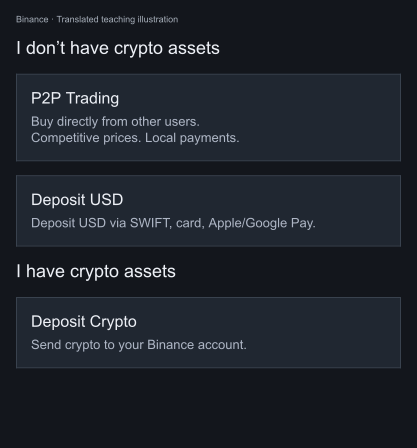
Binance on a computer: Deposit menu, P2P Trading option

On a computer: Deposit › P2P Trading.
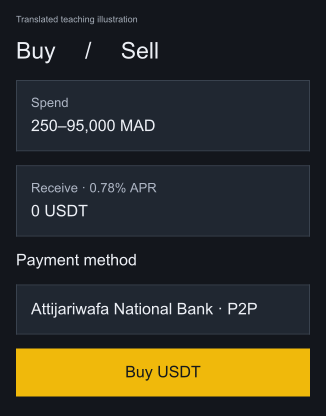
Binance: Buy USDT with MAD page

The "Buy Crypto" page picks the seller for you (here Attijariwafa via P2P), from 250 to 95,000 MAD.
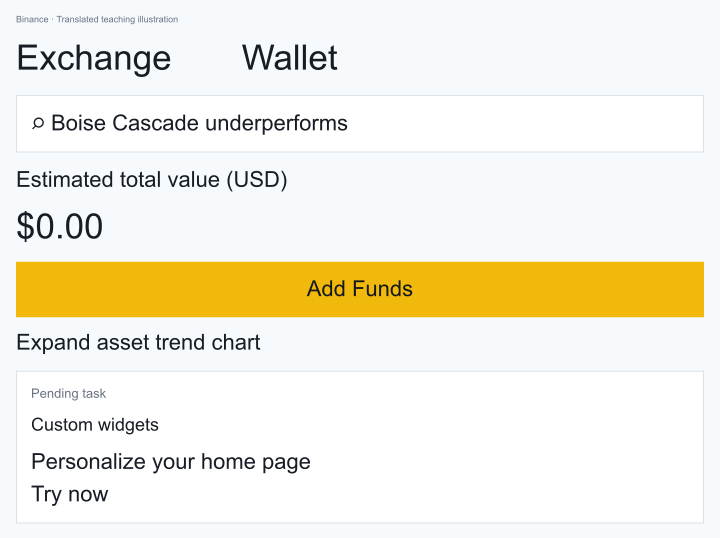
Binanceapp
Binance app: home screen with the Add Funds button
3

Set the filters and pick a good seller

  • Buy (green tab)
  • Crypto: USDT · Currency: MAD
  • Amount: what you want to pay, e.g. 1,000
  • Payment: your bank A or Cash Plus / Wafacash B
A good sellerVerified badge, more than 500 orders, over 98% completion. The cheapest is not always the best.
Price benchmarkAt the end of September 2026, Binance showed about 9.65 MAD for 1 USDT. Be wary of a seller who is much more expensive or much cheaper.
9:41●●● 4G
ExpressP2P
Buy
Sell
USDT ▾MAD ▾1,000 ▾Cash Plus ▾
✓
AtlasTrade ✓1,245 orders | 99.2%
9.65 MAD
Limit 200 – 5,000 MAD
Cash PlusCIHBuy
maroc_usdt2214 orders | 78%
9.41 MADavoid
Limit 100 – 20,000 MAD
4

Enter the amount and place the order

Tap Buy on the seller you chose, enter the amount in MAD, read the seller's terms, then confirm.

From that moment, the seller's USDT are locked by Binance: they can no longer sell them to anyone else.

A timer startsYou usually have 15 minutes to pay. Have your banking app ready, or place the order once you are already at the agency.
9:41●●● 4G
‹Buy USDT
Price9.65 MAD
1
I pay
1,000MAD
I receive
103.62USDT
Payment method
Cash Plus
Seller's terms: pay to the name shown only, no mention of "crypto" in the reference.
2Buy USDT
5

Pay the seller

Tap View payment details: you will find the seller's name and details there. Pay the exact amount, to the exact name shown.

Option A: bank transfer

  1. Open your banking app (account in your name).
  2. Send a transfer to the bank details (RIB) shown, exact amount.
  3. Reference: empty, or the order number. Never "crypto" or "USDT".
  4. Take a screenshot of the transfer.
9:41●●● 4G
Pay the seller14:32
Amount to pay
1,000.00 MAD
1
Bank transfer
NameYoussef A.
BankCIH Bank
RIB230 810 ···· 4521
Pay from an account in your name.
Transferred, notify seller

Option B: cash at an agency

  1. Go to a Cash Plus or Wafacash agency with your CIN.
  2. Send the amount to the seller's name (+ city or phone number if requested).
  3. Keep the receipt: it shows the withdrawal code.
  4. In the order chat, send a photo of the receipt and the code.
9:41●●● 4G
Chat · AtlasTrade09:05
Hello, please send to Youssef A., Casablanca. Please post the receipt here.
1
CASH PLUS · TRANSFER
Benef.: YOUSSEF A.
Amount: 1,000.00 MAD
Code: 8472 1935
Withdrawal code: 8472 1935
Transferred, notify seller
Agency feesThe agency charges a sending fee on top of the amount. Fewer, larger orders are better.
6

Confirm that you have paid

Once the payment is actually done, tap:

Transferred, notify seller

Tick the confirmation box. The order moves to Releasing: the seller checks that the money has arrived.

Never before payingConfirming without paying can get your P2P account blocked.
9:41●●● 4G
Pay the seller08:51
Amount to pay
1,000.00 MAD
7

Receive your USDT

As soon as the seller releases, the order shows Completed. Your USDT are in your Funding:

Assets › Funding

From there you can keep them, move them to Spot to trade, or withdraw them to another wallet.
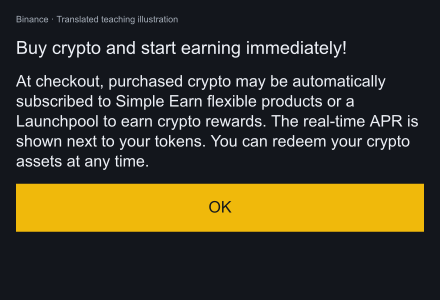
Not in Funding?Binance can automatically place the crypto you buy in Simple Earn (flexible products) or a Launchpool. Look in Earn: you can take them back at any time.
Binance message: purchased crypto may be automatically subscribed to Simple Earn

Translated teaching illustration of the Binance purchase-page message.

Seller taking too long?Write to them in the chat. If there is no answer once the time is up, open an Appeal in the order: Binance support decides based on your proof (receipt, screenshot).
9:41●●● 4G
‹Order details
✓
Order completed
The seller released the crypto
Received103.62 USDT
Paid1,000.00 MAD
Price9.65 MAD
✓Credited toFunding account
View my assets

The golden rules

Everything in your nameBinance account, bank account, agency receipt: the same name everywhere.
Everything in the Binance chatNever on WhatsApp or Telegram: no trace in the order means no recourse.
Start smallA first order of 200 to 500 MAD to get the hang of it.
Keep your proofTransfer screenshot or receipt photo, until the order is completed.
Never cancel after payingIf you have paid, never tap "Cancel": open an Appeal.
Ignore "agents" who message youBinance never contacts you privately to "unlock" an order.

Steps 2 and 7: teaching illustrations translated from the original French screenshots. Other screens: illustrative mock-ups. Labels may vary by version. Prices and amounts are historical examples. Revised 23 October 2026.